

Blog
How to build an interactive floor plan that converts
A practical guide to turning a static floor plan into a clickable tool for real estate listings, venue maps, and property tours.
Free forever plan · No credit card · Works in Wix, Webflow, WordPress, Shopify, Squarespace
Room-by-room labels
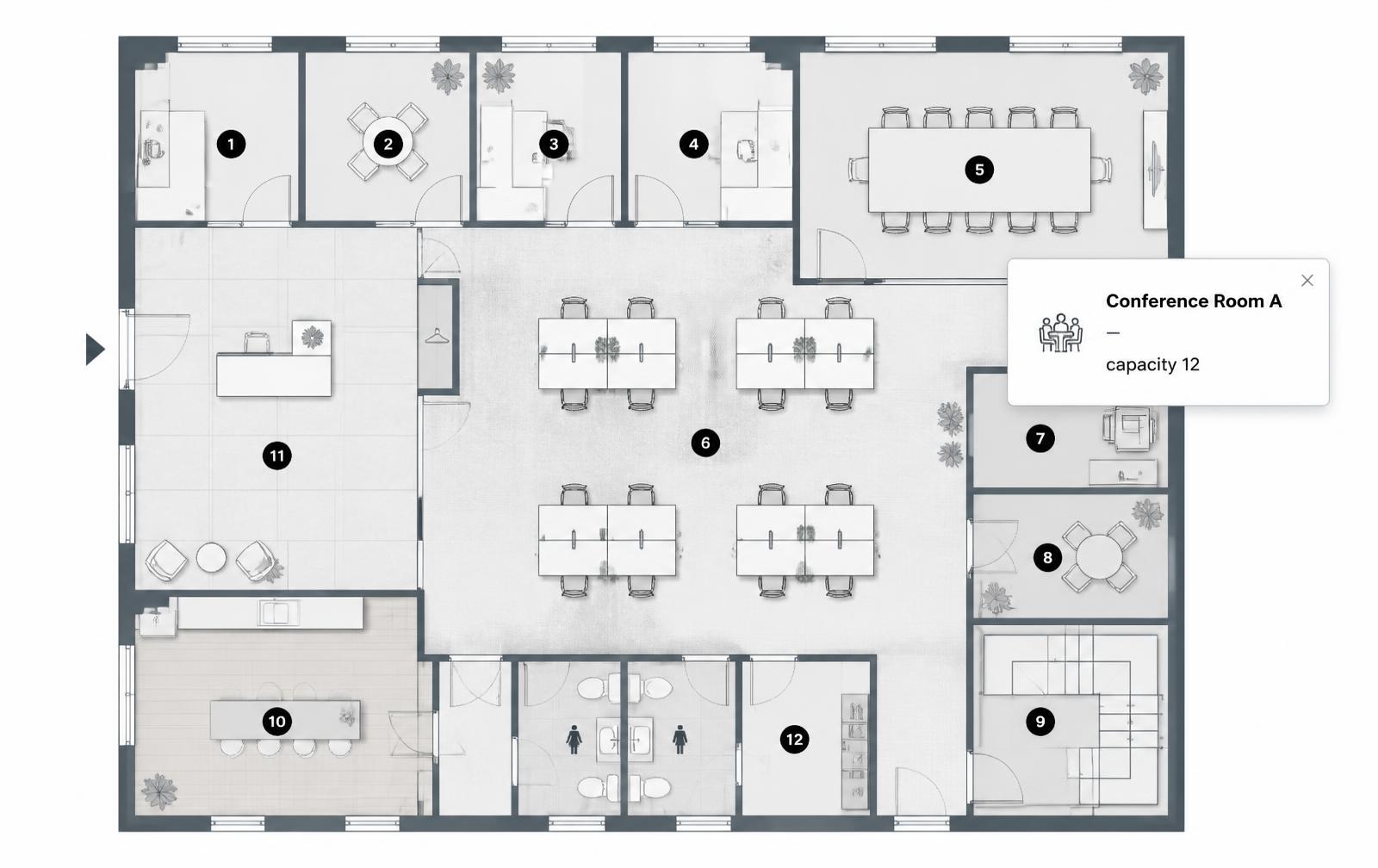
Click any room to see its name, dimensions, and photos without leaving the page.
Lead capture built in
Turn a hotspot into a scheduling link or contact form at the exact moment of interest.
Mobile-first popups
Popups reflow into an easy-to-tap layout on phones, where most listing traffic happens.
What you get
- One hotspot per room, not per detail
- Photo galleries and video links for standout spaces
- A single, consistent lead-capture call-to-action
- Mobile-first popup design for on-the-go browsers
- Reusable embed across every listing or venue page
By Interactive Image · Updated
Build room cards with the right content type
Choose Image map in New Map and use Upload Background Image for your floor plan. Add an Info dot for room details, Media for a photo or video, or Link for a listing or booking page. Enter each room's facts in Content; use separate lines for amenities. Availability is content you maintain, not a live reservation feed. For a campus with real street addresses, create a separate Mapbox map and connect the two using links.
Why static floor plans undersell a property
A flat floor plan image communicates layout, but it leaves visitors to imagine everything else: room size in real terms, natural light, finishes, or what's actually in that "flex space" off the kitchen. An interactive floor plan closes that gap by letting each room answer its own questions on click, without cluttering the plan with labels and captions that compete with the drawing itself.
Choosing and preparing the base image
- Use a top-down, to-scale plan rather than a perspective illustration — it's easier to click precisely.
- Increase contrast on scanned blueprints so wall lines are crisp against the background.
- Remove or minimize printed dimension labels if you plan to replace them with hotspot popups.
- Export at roughly 1600–2000px wide, which is sharp enough for zooming without bloating load time.
If you're building this for the first time, our general guide to making an interactive image covers export sizes and formats in more depth.
Placing room hotspots that actually help
Resist the urge to hotspot every square inch. A well-designed interactive floor plan usually has one hotspot per distinct room or amenity — bedrooms, living areas, kitchen, garage, outdoor space, and any standout feature like a fireplace or a home office nook.
| Hotspot content | When to use it |
|---|---|
| Room name + dimensions | Every room, as a baseline |
| Photo gallery | Kitchens, primary bedrooms, bathrooms, and outdoor spaces |
| 360° or video walkthrough link | Living areas and any "wow factor" room |
| Schedule-a-tour button | One primary hotspot, or the plan's overall popup |
Turning interest into leads
Real estate and venue floor plans have an advantage most product pages don't: intent is already high by the time someone is clicking around a layout. Use that moment well.
- Add a single, consistent "Schedule a tour" or "Contact agent" call-to-action inside the most-viewed rooms.
- Keep the form short — name, email or phone, and preferred time — since the popup is a secondary surface, not a landing page.
- Link out to a full listing page or brochure PDF for people who want more before committing to a tour.
For venues and event spaces, the same pattern works for booking inquiries: a hotspot on the main hall can open capacity details and a request-a-quote link, while smaller rooms link to their own spec sheets.
Designing for mobile visitors
Most real estate traffic today happens on a phone, often from a listing site's embedded link. An interactive floor plan needs to hold up at narrow widths:
- Popups should expand to a bottom sheet or full-width card rather than a small tooltip that's hard to read.
- Hotspot targets need enough tap area — a few extra pixels of invisible padding around a small dot goes a long way on touchscreens.
- Keep photo galleries inside popups swipeable, matching the gesture people already expect from listing photo carousels.
See our responsive image map generator guide for more on how percentage-based hotspots hold up across breakpoints.
Embedding on your listing site or MLS page
Beyond real estate: venues and event spaces
The same approach applies to wedding venues, conference centers, and coworking spaces: hotspot each bookable room or area with capacity, layout options, and a request-a-quote link. Browse interactive image examples for more layout ideas, or start building directly with the interactive image maker.
Frequently asked questions
Should every room have the same type of hotspot content?
No. Keep basics like name and dimensions consistent, but reserve photo galleries and video links for rooms that benefit most from extra detail.
Can I update the floor plan after publishing without breaking embeds?
Yes. Because the site embeds a single iframe, updating the source image or hotspots updates every page using that embed automatically.
Need it built for you?
Big maps, bulk hotspots, custom designs or integrations, built by our team at Upcode.
Turn any image into a guided experience.
Free forever plan. Paste one iframe into your site and ship.
Create your interactive image