

For WordPress
Add clickable hotspot images to WordPress.
Create an interactive image, copy one iframe, and paste it into Gutenberg, Elementor, Divi, or any WordPress page that accepts custom HTML.
Free forever plan · No credit card · Works in Wix, Webflow, WordPress, Shopify, Squarespace

Build your WordPress hotspot image here
Upload your image and click to place hotspots. Publish with a free account to get the iframe for a Custom HTML block or page-builder widget.

This is a live demo — nothing here is published yet. Create a free account to publish your image and get a one-line embed code for Wix, Webflow, WordPress, Squarespace or plain HTML, with hosted images, images and video in the cards, CTA buttons and edits that go live instantly. Free includes 1 published image with the Interactive Image badge; Pro removes the badge and unlocks white-label embeds.
Custom HTML block
Paste the iframe directly into a WordPress Custom HTML block.
Page builder friendly
Works with common HTML/code widgets in Elementor, Divi, Beaver Builder, and similar builders.
Update without republishing
Edit hotspots in Interactive Image and the embedded WordPress page stays current.
What you get
- No WordPress plugin required
- Works with Gutenberg and page builders
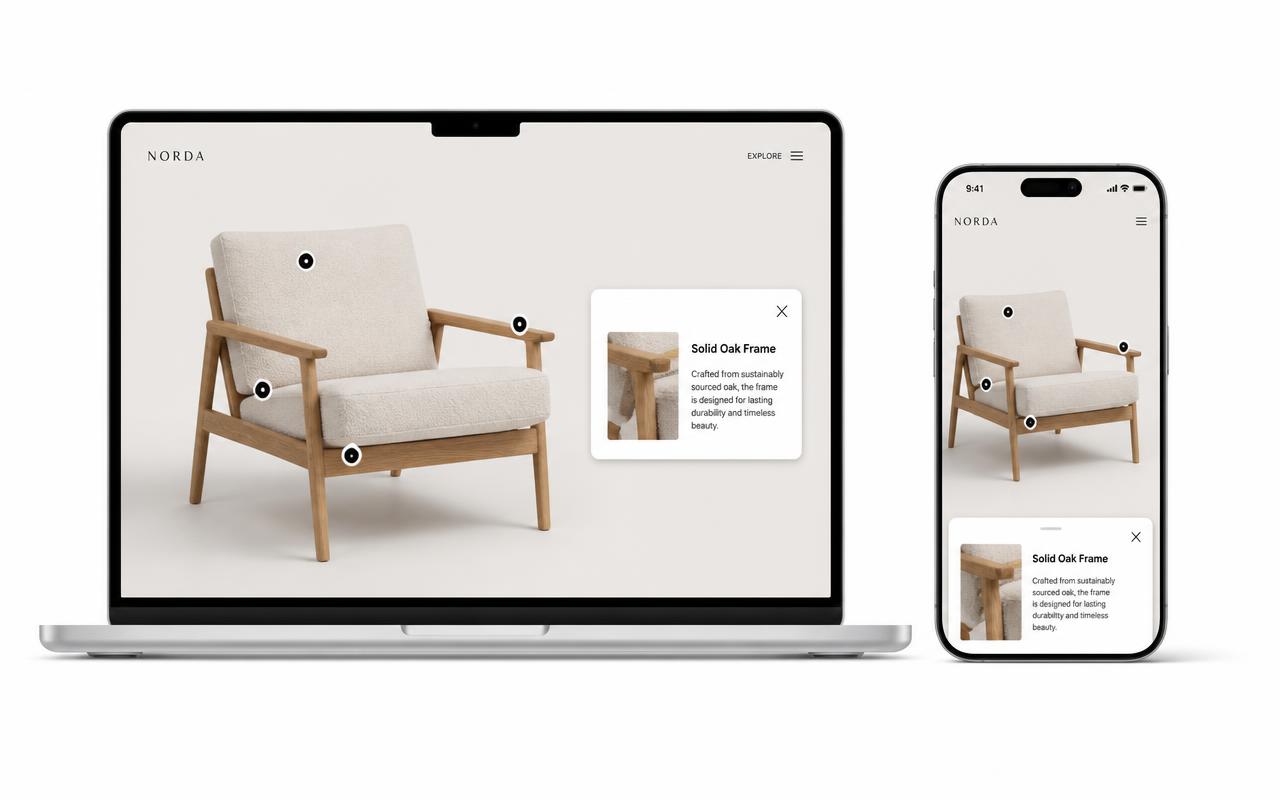
- Responsive hotspots for mobile themes
- Rich popups with media and links
- One source can appear on multiple WordPress pages
Gutenberg, Elementor, Divi: where the embed goes
- Gutenberg (block editor): Add block → Custom HTML, paste the snippet, then click Preview to confirm it renders. Avoid the Paragraph block — it escapes the tags.
- Elementor: use the HTML widget (not the Text Editor widget) and paste into the code area.
- Divi: add a Code module and paste into the content field.
- Classic editor: switch from Visual to the Text tab first, otherwise the editor strips the iframe on save.
For a sidebar or footer, use a Custom HTML widget under Appearance → Widgets. For a site-wide placement in a block theme, add the same Custom HTML block inside a template part in the Site Editor.
If WordPress strips your iframe
WordPress only lets some roles publish raw iframe HTML. Symptoms: the tag disappears on save, or the front end shows the raw code as text. In order of likelihood:
- You're an Editor or Author rather than an Administrator. Only the latter has the unfiltered HTML capability on single-site installs.
- You pasted into a Paragraph block or the Visual tab. Use Custom HTML or the Text tab.
- A security plugin (Wordfence, iThemes) or a managed host is sanitising post content. Whitelist the embed domain in that plugin's settings.
- On WordPress.com, iframe code requires a paid plan with hosting features activated. Self-hosted WordPress has no such restriction.
Sizing the embed inside a WordPress theme
Most themes cap content at 700–900px. The snippet is fluid, so it fills whatever column it lands in — just don't set a fixed height that disagrees with the image ratio:
<div style="position:relative;width:100%;aspect-ratio:16/9">
  <iframe src="https://interactiveimage.com/embed/YOUR-ID"
    style="position:absolute;inset:0;width:100%;height:100%;border:0"
    scrolling="no" loading="lazy" title="Interactive image"></iframe>
</div>
For a wider presentation on a block theme, set the Custom HTML block's parent group to Wide or Full width in the block settings. For a plugin-free alternative to legacy image map plugins, see the HTML image map alternative and Interactive Image vs WordPress plugins.
Build this with your own content
Add a clickable venue map to WordPress
Help visitors find entrances, stages, and amenities. Build your map once, then place it inside an event page or post.
Select a dot to try the sample. Use your own artwork and details when creating your project.
Explore the full example →From your image to a published page
- Upload your venue artwork and place a dot on each entrance, stage, or amenity.
- Give each location a clear name and practical details, such as opening times or an accessibility note. Use categories to group related places.
- Publish and copy the embed code. Insert a Custom HTML block in WordPress, paste the code, and save the page.
Check before sharing
- If WordPress removes the iframe when saving, check the account’s HTML permissions and hosting restrictions.
- On WordPress.com, activate hosting features on a paid plan before adding iframe code.
- Test the published page while logged out, including on a phone. Put the venue address and essential arrival instructions in regular page text.
Platform requirements checked September 27, 2026. WordPress’s official embed instructions
Setup at a glance
WordPress · Custom HTML block (Gutenberg) or Text tab (Classic)
- Time
- About 5 minutes
- Requirement
- Self-hosted WordPress with iframe permissions, or WordPress.com paid hosting
- Block
- Custom HTML
- Plugin required
- None
- Page builders
- Elementor, Divi, Beaver
Step by step
How to add an interactive image to WordPress
Five steps, no developer. Everything below happens once — after that you edit hotspots in Interactive Image and your WordPress page updates on its own.
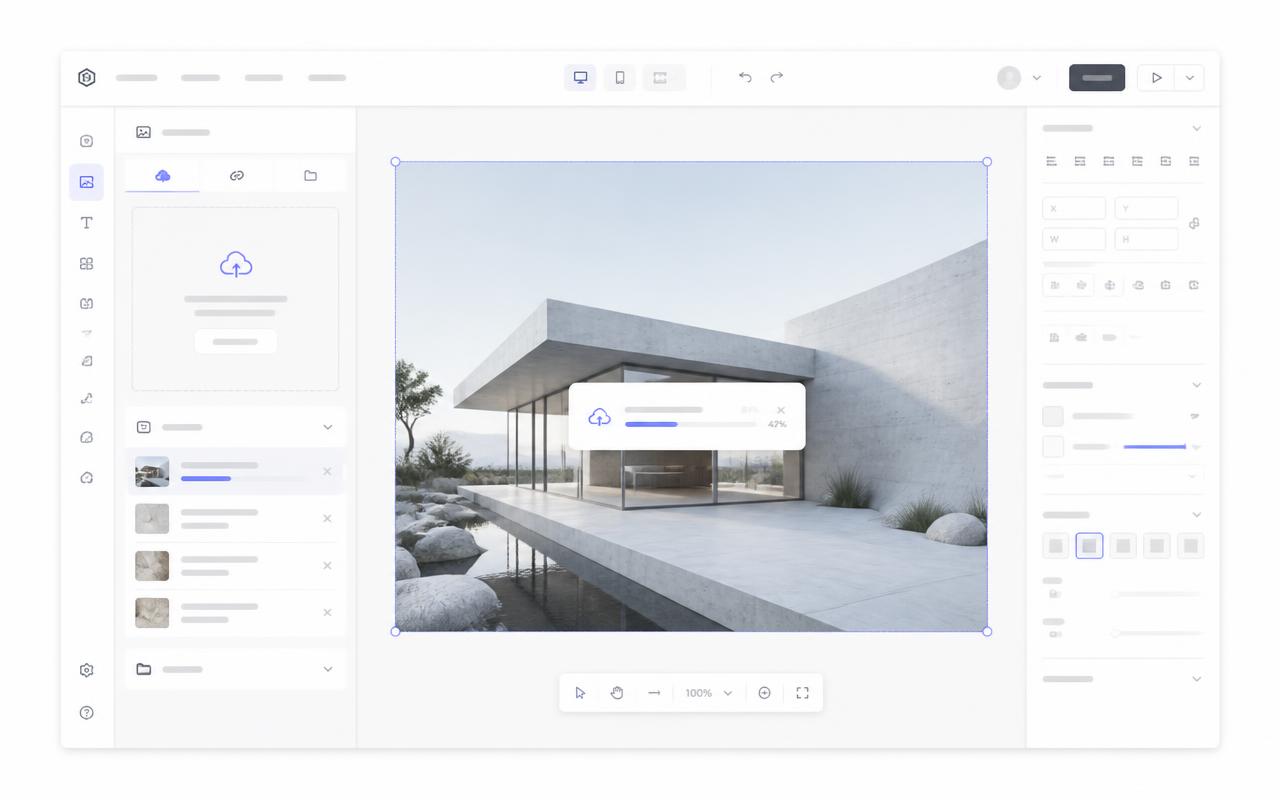
- 01
Upload your image
Start a new interactive image and upload the visual you want to annotate. Interactive Image keeps the full frame — no forced crop.
- 02
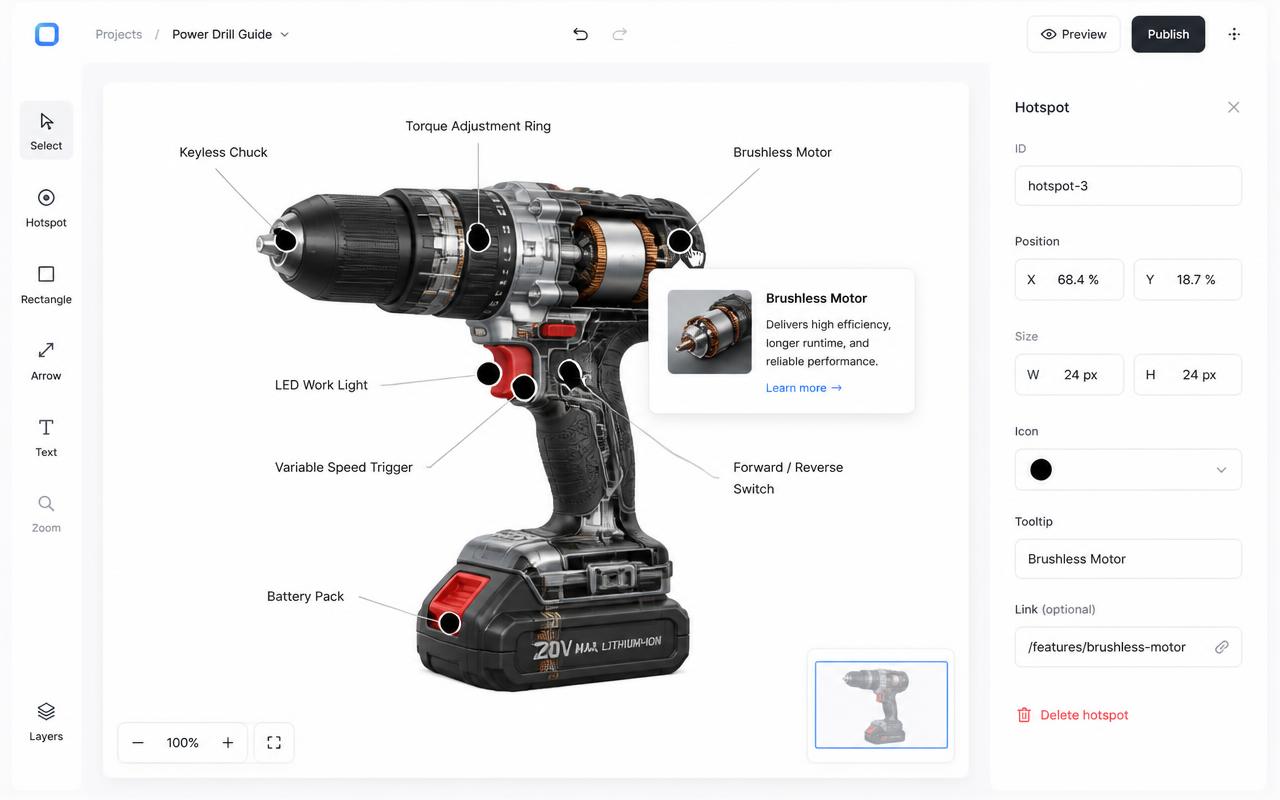
Add hotspots and content
Drop dots on the details that matter and fill in titles, descriptions, images, video, and links for each card.
- 03
Copy the responsive iframe
Grab the snippet from the Embed panel. It's plain HTML — no plugin, no JavaScript library to enqueue.
<div style="position:relative;width:100%;padding-top:56.25%">
  <iframe src="https://interactiveimage.com/embed/YOUR-ID"
    style="position:absolute;inset:0;width:100%;height:100%;border:0"
    scrolling="no" loading="lazy"></iframe>
</div>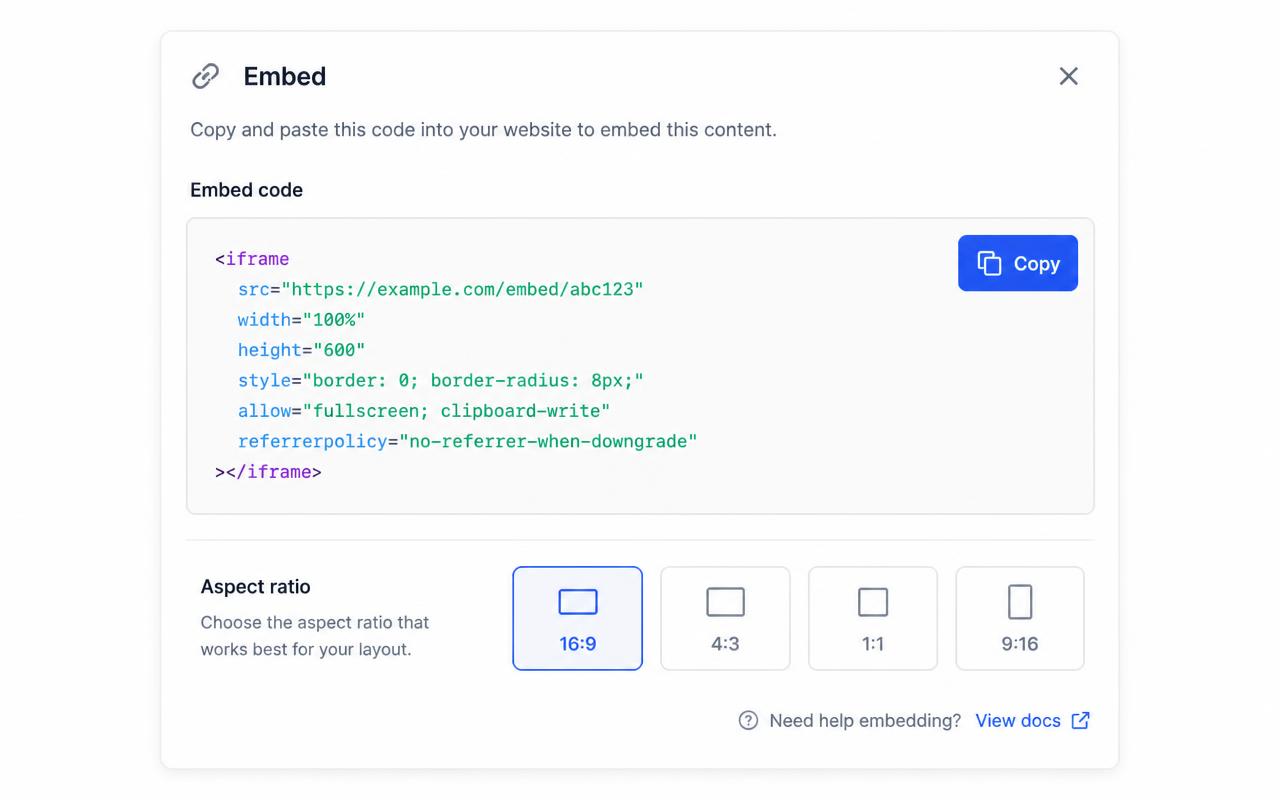
- 04
Insert a Custom HTML block
In the block editor, press / and type "custom html", then paste the snippet. On the Classic editor, switch to the Text tab and paste it there. Elementor users can use an HTML widget.
- 05
Preview and publish
Preview the post, confirm the embed fills the content column, then publish. Purge your caching or CDN plugin if the page is cached.
Troubleshooting
Fixes for the WordPress issues people hit
The iframe disappears when I save
Use a Custom HTML block, then check your user’s HTML permissions and host restrictions. On WordPress.com, iframe tags require a paid plan with hosting features activated.
It works logged in but not for visitors
That's almost always a caching plugin serving an older page. Clear the page cache and CDN after publishing.
Where do I choose the map type and edit a dot?
In the account dashboard, New Map offers Image map or Mapbox map. This choice is fixed after creation. For image maps, choose Upload Background Image and Add new dot; geographic maps offer address search and Import locations. Select a dot and use Content for its type, text, media, and links, Appearance for that dot, and Map settings for shared defaults. Enable embedding and copy the current snippet before publishing it on your website.
The embed looks cropped or has scrollbars
The iframe height doesn't match the image aspect ratio. Copy a fresh snippet from the Embed panel — it bakes the exact ratio into a padding-based wrapper — or set the iframe height to width ÷ aspect ratio.
Hotspots look slightly offset from the artwork
That happens when the container letterboxes the image. Interactive Image measures the rendered image box, so hotspots stay glued to the artwork — just make sure you didn't force a fixed height that differs from the image ratio.
Changes aren't showing on the live site
Save in the editor, then hard-refresh the published page. The embed always renders the latest saved version — you never need to re-paste the snippet unless the aspect ratio changed.
Frequently asked questions
Will WordPress strip the iframe?
Administrators can usually publish iframe HTML. If your role cannot, ask a site admin to paste the embed or adjust allowed HTML settings.
Can I embed more than one interactive image?
Yes. Add a separate iframe for each image.
Which block should I use in the WordPress block editor?
The Custom HTML block. A Paragraph block escapes the tags and prints the code as text, and the Classic editor's Visual tab strips iframes on save.
Does it work on WordPress.com as well as self-hosted WordPress?
Self-hosted WordPress requires an account permitted to add iframe HTML. On WordPress.com, iframe code requires a paid plan with hosting features activated.
Do I need an image map plugin?
No. Plugins add update surface, break on major WordPress releases, and store hotspots inside your database. The iframe approach keeps the hotspot data outside WordPress, so nothing breaks when you switch theme or plugin.
Need it built for you?
Big maps, bulk hotspots, custom designs or integrations, built by our team at Upcode.
Turn any image into a guided experience.
Free forever plan. Paste one iframe into your site and ship.
Create your interactive image